


EATON 80 Series Photoelectric Sensor Switch Bodies
Eaton 80 Series photoelectric sensor switch bodies are used to sense the presence or absence of an object in dusty, dirty, wet, smoky and steamy application environments. They are used in electrical assemblies, panels and EOEMs.
Filter
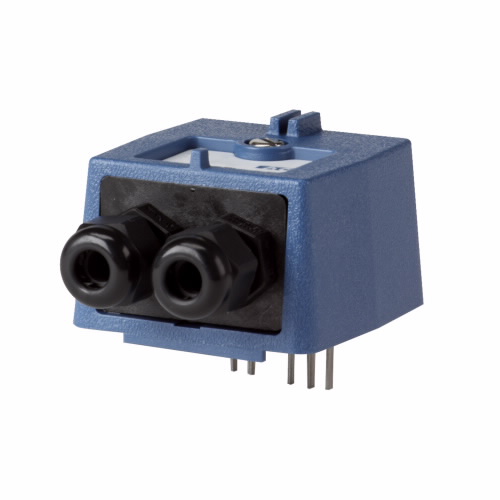 A
A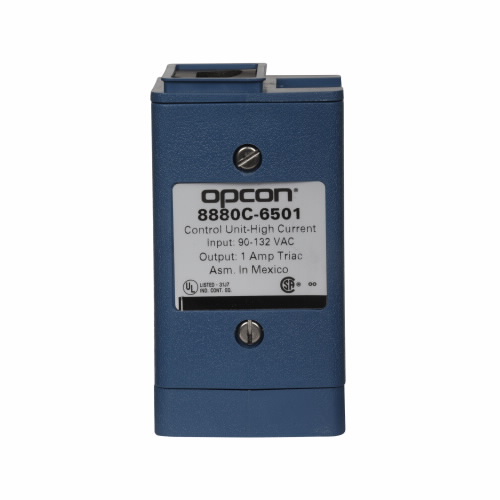 B
B| Style | Model | Height | Input Voltage | Max. Amps | Contact Rating | Enclosure Material | Connection | Min. Operating Temp. | Max. Operating Temp. | Price | |
|---|---|---|---|---|---|---|---|---|---|---|---|
| A | 8880C-7501 | 2" | 10-30V DC | 200 mA | 200 MA at 10-30V DC | Noryl | Screw Terminal | -4°F | 131°F | €794.42 | |
| A | 8880C-6502 | 4" | 97-130V AC | 50 mA | 50 MA at 132V AC/188V DC | Noryl | Screw Terminal | -4°F | 131°F | €1,933.88 | |
| B | 8880C-6501 | 4" | 97-130V AC | 1A | 1A at 130V AC | Noryl | Screw Terminal | -4°F | 131°F | €1,914.93 |
Working Mechanism
- A light-sensitive device detects the presence / absence of an object.
- The sensor has an LED light source to send a beam of light towards the object being detected.
- The sensor then sends a signal to the switch body after the object interrupts the light beam.
- The circuit then activates or deactivates depending on the specific configuration of the switch.
- The sensor's sensitivity is adjusted using the built-in sensitivity control on the switch body.
- LED indicators on the switch body provide visual feedback about the status of the sensor and the circuit.
Features
- These sensor switch bodies offer Noryl enclosure for low moisture absorption and enhanced hydrolysis resistance.
- They come with 9 sensor heads, 3 logic modules and 7 control base units to customise the sensor according to application.
- These photoelectric sensors are equipped with LED indicators for easy visual feedback about the sensor's performance.
- They feature adjustable sensitivity settings for enhanced performance.
Standards and Approvals
- UL
Frequently Asked Questions
What mounting options do these switch bodies allow?
Eaton 80 Series switch bodies allow panel, wall or ceiling mounting for easy and secure installation.
What is the operating temperature of these sensor switch bodies?
-4 to 121 degrees F.
How to install Eaton 80 Series photoelectric sensor switch bodies?
- Determine the appropriate mounting location for the switch body.
- Install the mounting bracket by using the exact mounting hardware.
- Connect the sensor head with the help of the supplied connector cable. Wire the switch body to the electrical circuit as per the wiring diagram mentioned in the installation manual.
- Regulate the sensitivity of the sensor with the help of the built-in sensitivity control on the switch body.
- Test the switch whether it is functioning properly or not.
We are here to help!
Looking for a part not listed here?
Explore More
- DRIV-LOK
- KERICK VALVE
- KEYSHAFT
- SANITAIRE
- NEXUS
- Battery Testers
- Mounting Base
- Cord Adapters
- Digital Temperature Switches
- Antennas
- ANSELL 87-198 Alphatec Pink Chemical Resistant Gloves
- DESTACO 341-M Series Pull Action Latch Clamps
- H.K. PORTER Center Cut Cutters, Industrial Grade
- GLOBE SCIENTIFIC Labeling Tapes, 1 Inch x 500 Inch per Roll
- OK INDUSTRIES Manual Wire Wrap Kits
- EATON Power Distribution Terminal Blocks
- MILWAUKEE Convertible Hand Trucks
- BOSCH Digital Levels
- CALBRITE LL Conduit Bodies, Stainless Steel
- WATTS JUMPER KITS Series Pressure Reducing Valve Kits